RevOps Hygiene: Why Your CRM Is Leaking Revenue
The invisible infrastructure problems that let pipeline disappear before it reaches your reps.
TL;DR
- CRM hygiene fails are not data-entry failures, they are missing-check failures: nothing in the system stops a duplicate, a stale contact, or an unowned account from being created in the first place.
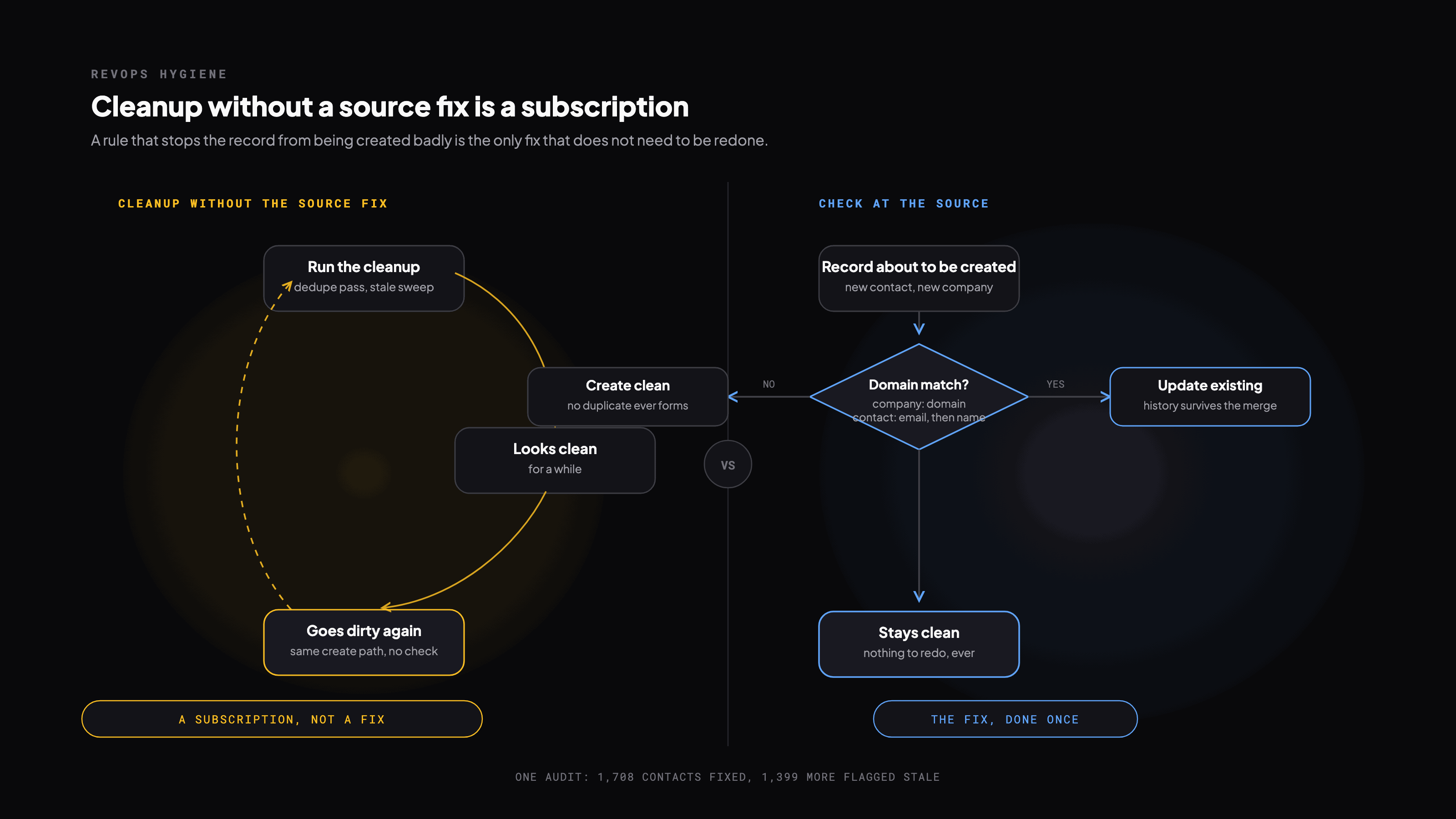
- A cleanup that does not also add the check gets dirty again on the same schedule it always has. Cleaning without fixing the source is a subscription, not a fix.
- Duplicates dedupe on domain for companies and email for contacts, in that order, because those are the two identifiers a fuzzy name match will lie to you about.
- Stale contacts get a flag and a pause, never a silent delete: the record's history is evidence for the next person who touches the account.
A CRM does not lose revenue the day a record goes bad; it loses revenue the day a rep works a dead deal for three weeks, or a campaign burns sender reputation on a batch of addresses that should have been flagged stale a quarter ago. Nothing about that shows up on a dashboard until the pipeline number comes in short, which is exactly why hygiene gets treated as janitorial work instead of infrastructure. It is infrastructure. Every fix below is worth doing twice: once to clean the mess, once to make sure the mess cannot reform the same way.
The five problems, and what actually causes each
| Problem | Symptom | Root cause | Verdict |
|---|---|---|---|
| Duplicate records | Same entity, multiple records | Nothing checks for an existing record before creating a new one | Fix the create path, not the backlog |
| Stale contacts | People who left still in sequences | No re-verification cadence, ever | Flag and pause, never silently send |
| Broken ownership | No owner or wrong territory | A rep leaves and nothing reassigns their book | Audit blank owners on a calendar, not a memory |
| Missing data | Blank size, industry, revenue fields | Enrichment never ran, or ran once and rotted | Broken scoring is a data problem wearing a strategy costume |
| Inconsistent naming | 'Acme', 'Acme Inc', 'ACME Corp' | No canonical-name rule at entry | Every downstream rollup inherits this bug |
Duplicates are a system design problem, not a data-entry one
Nobody sits down and decides to create a duplicate. Multiple reps add the same contact from different sources, an import skips the existing-record check because nobody wired one in, an integration pushes records with no dedup logic, and inconsistent naming defeats whatever fuzzy match was supposed to catch it. Blaming the rep who added the fifth 'Acme Inc.' misses that the system let them.
- 01Export companies, dedupe by domain: the one identifier a naming variant cannot fool.
- 02Dedupe contacts by email first, then name plus company as the fallback.
- 03Pick a canonical record per entity, the one that survives the merge and inherits the activity history.
- 04Merge or archive. Never delete, the history is what tells the next person this was already worked.
- 05Set the rule that ends the cycle: a match on existing domain or email updates the record instead of creating a new one.
A single CRM deduplication and LinkedIn verification pass for one client, with 1,399 more contacts flagged as stale in the same pass.
Stale contacts: the cost is not the bounce, it's the sender reputation
A stale contact does not just fail to convert, it teaches your sending domain that you don't check your lists, and that lesson is expensive to unlearn. Employment verification is not a nice-to-have step before a bulk send, it is the send's actual gate.
- Run LinkedIn employment verification before any bulk send, not as a periodic cleanup pass after the fact
- Verify emails before every campaign launch, not just once at list-build time months earlier
- Set a 'last verified date' field and re-verify anything that has gone stale against it
- Stale contacts get a flag and a pause, not a delete, because the record itself is still useful history
Territory and ownership break silently, which is the whole problem
A rep leaves and a block of accounts sits unowned, invisible to everyone, until someone notices pipeline that should exist does not. Audit for blank owners monthly on a calendar, not when someone happens to notice. Route inbound leads fast, version-control the territory rules the way you would any other logic that determines who gets paid, and reassign a departing rep's book on their last day, not whenever the next headcount review happens to surface it.
Where to actually start
Fix dedup at the source before touching the existing backlog: a cleanup done before the create-path check just gets dirty again on the same timeline. Verify emails on any list actively being sent to, before the audit gets to everything else. Audit owner assignment, because an unowned account is revenue the pipeline report is currently lying to you about. Standardize company naming last, because it is the foundation every other cleanup depends on and the one nobody wants to do first.
Get the runnable version
Enter your email and we'll send you this playbook, plus the open GitHub repo of setup skills when it ships.
Want this built for your team?
We build and run these systems embedded with your team.