How to Build Email Infrastructure That Lands in the Primary Inbox
Domain math, DNS, warmup, and the test-send gate: the infrastructure stack for cold email that actually gets delivered.
TL;DR
- Never send cold email from a primary brand domain. Use alternates built to absorb the risk the brand domain cannot take.
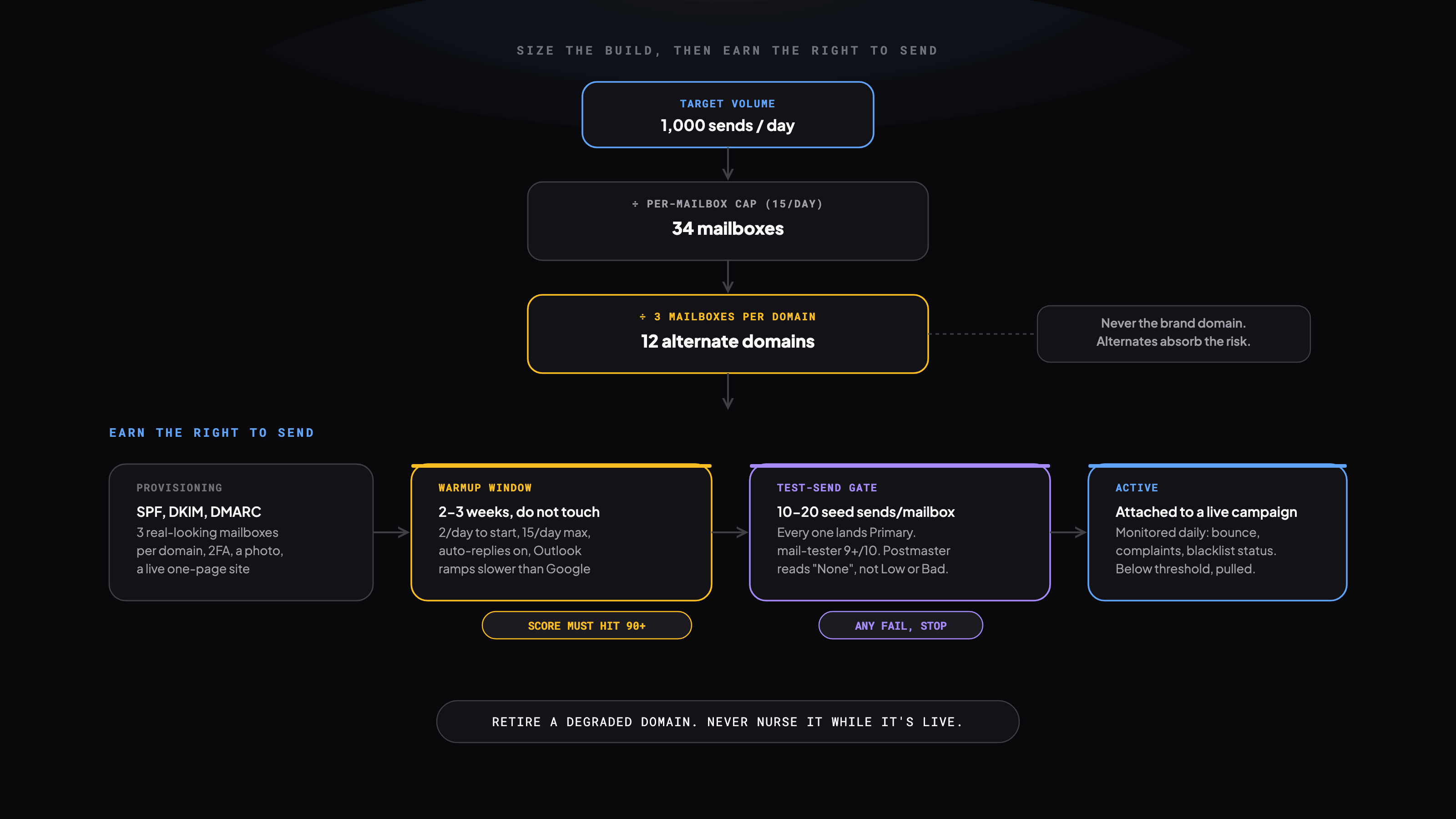
- Size the build with math, not a guess: target volume divided by per-mailbox cap gives mailboxes, mailboxes divided by mailboxes-per-domain gives domains.
- 3 mailboxes per domain, 2-3 weeks warmup, a 90+ warmup score and a 9+/10 mail-tester result before any campaign touches it.
- Steady-state infrastructure for 1,000 sends/day runs $270-470/month once domains, mailboxes, platform, and verification are all counted.
Deliverability is infrastructure, not copywriting. The best cold email in the world does nothing from a spam folder. We build and monitor sending infrastructure the way we would build production infrastructure: sized against a target volume, measured daily, and retired the moment it degrades, never nursed back to health while it is live.
Why Never Send From Your Primary Domain
- Bounce rates above 2% get the sending domain flagged, not just the mailbox.
- Spam complaints accumulate on the domain and outlast any single campaign.
- A blacklisted domain does not recover fast enough to be worth trying. Retire it instead.
- Primary domain reputation carries your transactional and internal email too. One bad campaign risks both.
- Cold email is a volume game. Alternates absorb the risk the brand domain cannot afford to take.
Sizing the Build
Target daily volume divided by your per-mailbox cap gives mailboxes needed. Mailboxes divided by mailboxes-per-domain gives domains needed. Keep the per-mailbox cap well under whatever ceiling the platform states, and give Outlook mailboxes a lower cap than Google Workspace mailboxes, they need it.
| Daily volume | Mailboxes (approx.) | Domains (approx.) |
|---|---|---|
| 500/day | 17 | 6 |
| 1,000/day | 34 | 12 |
| 2,500/day | 84 | 28 |
| 5,000/day | 167 | 56 |
Structuring Alternate Domains
- Prefixes: get-company.com, try-company.com, meet-company.com
- Suffixes: company-hq.com, company-team.com
- TLD variation: company.co, company.io, only if credible for the industry
- Avoid spammy hyphens, misspellings, unrelated words
Before you buy
- Check mxtoolbox.com/blacklists. A domain with a prior flag is dead on arrival.
- Check archive.org/web for prior use. An old spam domain carries residual damage no amount of warmup fixes.
- Stick to .com. Hyphens and unusual TLDs read as spam before the first send goes out.
- Buy every domain from one registrar. Staggering registrars buys you nothing and complicates DNS management later.
The Three DNS Records Every Domain Needs
| Record | What it does | Detail |
|---|---|---|
| SPF | Authorizes which IPs can send for the domain | v=spf1 include:_spf.google.com include:sendgrid.net ~all. Use -all only once every sender is confirmed listed. |
| DKIM | Cryptographically signs each email | Generate in the mailbox provider, add the public key as a TXT record, use 2048-bit keys, allow 24-48h to propagate. |
| DMARC | Tells servers what to do on an SPF/DKIM fail | v=DMARC1; p=none; rua=mailto:dmarc-reports@yourdomain.com. Start at p=none, move to p=quarantine after 30 days. Jumping straight to reject on a new domain is how you lose legitimate mail. |
Provisioning Tools
| Tool | Role | Why we use it |
|---|---|---|
| Dynadot | Domain registrar | API-based purchase and DNS management, supports bulk registration |
| ZapMail | DNS + mailbox setup | Auto-configures SPF/DKIM/DMARC, creates mailboxes, integrates with Workspace and Outlook |
| Google Workspace | Mailbox provider | Higher placement for B2B recipients on Google-hosted domains |
| Microsoft 365 | Mailbox provider | Better placement targeting Outlook-hosted domains, warmup settings differ |
Provisioning Flow, End to End
- 01Generate 3-5 alternate domain variations for the brand.
- 02Purchase via Dynadot.
- 03Point nameservers to ZapMail. It auto-configures SPF, DKIM, DMARC, MX.
- 04Create 3 mailboxes per domain in Workspace or 365, real-looking names, never sales@ or outreach@.
- 05Import mailboxes to the sending platform and enable warmup immediately.
- 06Wait 2-3 weeks. Do not touch campaigns until warmup score hits 90+.
Mailbox realism, non-negotiable
- A real profile photo. A blank one is a spam signal filters actually check for.
- A plain signature: name, title, company, a real link.
- A basic one-page website on the sending domain. Filters check that it resolves.
- 2FA enabled on every mailbox.
How Warmup Works
| Setting | Value | Why |
|---|---|---|
| Initial send volume | 2 emails/day | A conservative start avoids an immediate flag |
| Max warmup volume | 15 emails/day/mailbox | Standard cap during the warmup phase |
| Auto-reply rate | Enabled | Simulated replies raise the engagement score |
| Duration | 2-3 weeks | Score needs 90+ before live sends |
| Google vs Outlook | Different ramps | Outlook needs a slower ramp, do not use the same schedule for both |
Test Before You Flip a Campaign Live
- 01Send 10-20 real-copy test emails per mailbox to seed accounts across personal and corporate Gmail, Outlook, and Yahoo.
- 02Check every one: did it land Primary? Any non-Primary landing, do not proceed.
- 03Run mail-tester.com. 9+/10 to proceed, below 8 means a DNS or content problem, not bad luck.
- 04Check Postmaster Tools. New domains should read "None". "Low" or "Bad" is a real problem, not noise.
When a test send fails
- Lands in Promotions: usually an HTML-heavy email or an image signature. Strip to plain text.
- Spam on Gmail: check DMARC and warmup score, confirm the domain has a live site.
- Spam on Outlook: stricter on new domains than Gmail. A few extra warmup days sometimes fixes it.
- mail-tester below 8: re-verify SPF, DKIM, DMARC before touching anything else.
Choosing a Sending Platform
| Platform | Best for | Key strength |
|---|---|---|
| EmailBison | High-volume, multi-workspace | Isolated workspaces, native warmup. Our default at agency scale. |
| Instantly | Fast setup | Clean UI, strong warmup, straightforward account management |
| Lemlist | Multichannel | Best-in-class LinkedIn sequencing alongside email |
| SmartLead | Analytics-heavy teams | Deep A/B testing, more infrastructure to manage than the others |
Scaling From 10 to 100+ Mailboxes
- 01Set target daily send volume first. It determines mailbox count, not the other way around.
- 02Budget 15 emails/day/mailbox at full warmup.
- 031,000 emails/day needs roughly 70 warmed mailboxes.
- 04Stagger domain purchases. Never buy 20 from one registrar the same day.
- 05Stagger warmup starts a week apart so batches do not degrade together.
- 06Keep a 20-30% reserve pool in warmup at all times.
- 07Never mix sender pools across clients or campaigns.
10 domains, 3 mailboxes each, 15 emails/day/mailbox. This is the practical throughput of a standard build.
Daily Monitoring
| Metric | Check how | Alert threshold |
|---|---|---|
| Warmup score | Sending platform dashboard | < 90, pull from rotation |
| Bounce rate | Platform analytics | > 2%, pause and investigate |
| Spam complaint rate | Google Postmaster / Microsoft SNDS | > 0.1%, immediate investigation |
| Blacklist status | MXToolbox | Any listing, pull domain immediately |
| Inbox placement | Seed test across major providers | < 80% inbox, flag as degraded |
| DMARC pass rate | Aggregate reports | < 95%, DNS config issue |
When a Domain Degrades
- Pull it from campaign rotation immediately, then re-enter warmup
- Run a placement test. Below 80% inbox, pause the domain entirely
- Check MXToolbox. If blacklisted, submit removal and shift campaigns off it
- Test again after warmup completes before re-activating
- If it cannot recover, retire it and provision a replacement
Domain lifecycle
- Provisioning: purchased, DNS being configured
- Warming: mailboxes warming, not sending campaigns
- Active: score 90+, attached to live campaigns
- Degraded: below threshold, removed, re-warming
- Retired: burned, permanently removed
What Steady State Costs
| Item | Cost (1,000/day setup) | Notes |
|---|---|---|
| 12 domains (annual) | $120-180/year | Amortizes to $10-15/mo |
| 34 Google Workspace mailboxes | ~$200/month | Bulk of the recurring cost |
| Sending platform | $30-200/month | Depends on tier |
| Email verification (BounceBan) | $25-50/month | Scales with verification volume |
| Total (steady state) | $270-470/month | For roughly 1,000/day sending capacity |
Common Mistakes
- Sending from the primary brand domain
- Skipping warmup: a cold domain sending 100/day gets flagged within hours
- Missing DMARC, so spoofed mail using the domain is undetectable
- Pushing unverified emails; even 3% bounce trips filters
- Not monitoring blacklists; domains get listed with no campaign-level signal
- Sharing one domain across clients or campaigns
- Jumping from 50 to 500 emails/day without a gradual ramp
Get the runnable version
Enter your email and we'll send you this playbook, plus the open GitHub repo of setup skills when it ships.
Want this built for your team?
We build and run these systems embedded with your team.