How to Use Clay for B2B Prospecting
A complete setup guide for account scoring, enrichment waterfalls, and automated research pipelines.
TL;DR
- Clay is an enrichment and automation platform, not just a data tool. It amplifies your targeting, good or bad, so define your ICP before building your first table.
- Build an enrichment waterfall: multiple providers, sequential fallback, one verified email.
- Use Claygent for AI research only after accounts pass scoring; it costs more credits than structured enrichment.
- Connect Clay to your sequencer via webhook so the pipeline runs continuously, not as a one-time export.
Clay does not fix your targeting; it multiplies it. A wide waterfall of data providers, AI research, and scoring formulas running against a fuzzy ICP does not produce fuzzy results slower, it produces confidently wrong results at volume, on a credit bill that goes up every time you run it. The table only earns its keep once the ICP feeding it is specific: not 'tech,' but 'B2B SaaS with sales teams over 10 reps,' with the headcount range, geography, tech-stack signals, and exclusions written down before the first enrichment column runs.
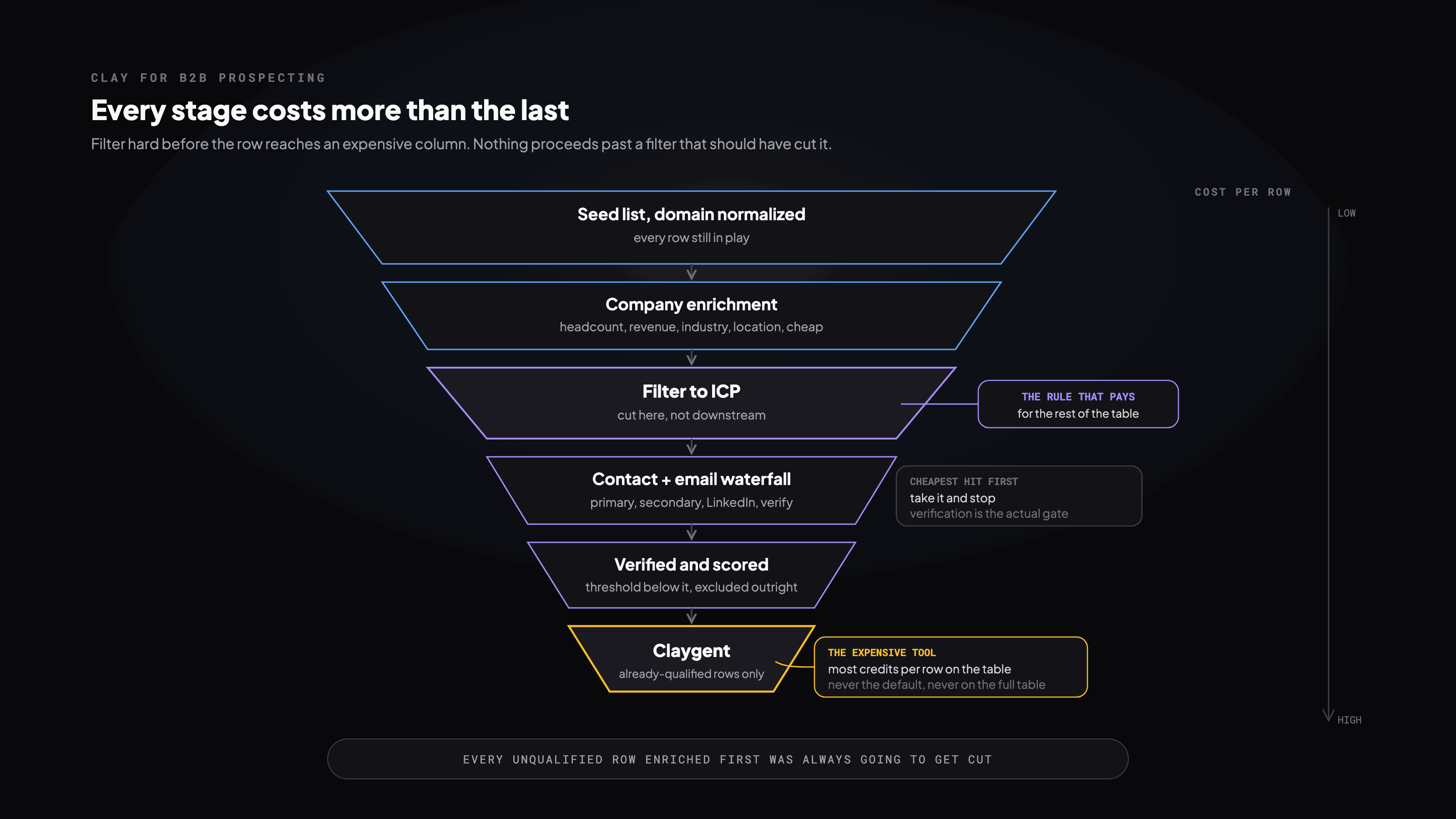
The build order, and why it runs in this direction
Company enrichment before contact enrichment, contact enrichment before email, email before Claygent: each stage exists to filter the row count going into the next one, because each stage costs more than the last. Import a seed list, normalize the domain column, and enrich company data first: headcount, revenue, industry, location. Filter to ICP before a single contact enrichment call runs. Only then pull decision-makers by title, then run the email waterfall, then verify. Nothing proceeds past a filter that should have cut it.
The rule that pays for the rest
- Enrich company data first because it is cheap; filter hard before contact enrichment because that is where cost starts to compound
- Verify only emails that survived every filter
- Never run Claygent on an unqualified account: it is the most expensive column on the table, reserved for rows that already earned it
The enrichment waterfall
| Step | Provider type | Fires when | Verdict |
|---|---|---|---|
| 1 | Primary email finder (Apollo, Hunter-class) | Always tried first | Cheapest hit rate, take it and stop |
| 2 | Secondary finder (Findymail, Icypeas-class) | No result or low confidence from step 1 | Second opinion, not a first choice |
| 3 | LinkedIn-based finder | Still no verified result | Last resort before the expensive path |
| 4 | Email verification | Every found email, no exceptions | The actual gate; nothing ships without it |
| 5 | Block on undeliverable | Bounce risk over threshold | Dropped, not sent, not flagged for later |
Scoring is a bet on your own win data, not a template
Formula columns assign points to signals and sum into a score: headcount and revenue in range, a relevant tech-stack tool, recent funding, an active job posting, industry match. The weights are the entire exercise. Pull them from your own closed-won pattern, not a generic template someone else's ICP produced, and set a real threshold below which an account is excluded outright rather than quietly sent downstream anyway.
Claygent is the expensive tool, not the default one
Claygent is Clay's AI browsing agent: it visits a URL and answers a freeform question, summarizing a product or judging competitor versus prospect. It costs meaningfully more credits than structured enrichment, which is the whole reason it runs last, one prompt per already-qualified account, never across the full table. Running it before scoring is the single most common way we see a Clay bill balloon for no return.
Connecting to a sequencer
Build a view on your export filter: score above threshold, email deliverable, no CRM match. Add a webhook column that fires on entry, mapping email, name, company, and variables, and add a 'pushed' boolean so nothing enrolls twice. Test on a handful of rows before the full table goes live; a webhook mapping error at 5 rows is a fix, the same error at 5,000 is a mess in your sequencer you cannot easily undo.
Where Clay bills go to die
| Mistake | Why it costs you |
|---|---|
| Enriching before filtering | Every unqualified row you enrich first was always going to get cut; the credits are already spent |
| Skipping verification, or skipping CRM dedup | A bounce and a duplicate outreach are the same failure: money spent finding out what a filter would have told you free |
| Claygent on the full table | The one column that costs the most, run on the rows least likely to need it |
| No 'pushed' gate on the webhook | Contacts re-enroll on every table refresh, and the sequencer cannot tell you it happened |
In production this stops being one table and becomes three: account intake, contact finder, and scoring/export, wired to run continuously rather than as a one-time pull. Signals enter the top, verified and scored contacts exit the bottom into the sequencer, and the table keeps working while you sleep instead of waiting for the next manual run.
Get the runnable version
Enter your email and we'll send you this playbook, plus the open GitHub repo of setup skills when it ships.
Want this built for your team?
We build and run these systems embedded with your team.