The Exact Cold Email Tech Stack We Run for 10+ Clients (With Costs)
Not a listicle. Our actual stack, fully transparent -- what we use, what we tried, what we dropped, and what it costs.
TL;DR
- We manage 100+ sending domains across 10+ clients. Six layers: enrichment, research, sending infrastructure, campaign platforms, CRM, analytics.
- Multi-source enrichment beats a single provider: chaining Blitz, LeadMagic, and a couple of specialty providers behind BounceBan verification consistently outperforms any single source.
- Minimum viable stack: $80-150/month. Full agency stack across all clients scales into the thousands per month, spread across ten-plus clients.
- What not to buy: all-in-one platforms, AI writing tools, and done-for-you domain packages at a markup.
We run outbound for 10+ clients, and we have dropped more tools than we kept. This is the exact stack, what each piece costs, and why it survived. No affiliate links. Six layers, each depending on the ones below it: skip one and the whole thing breaks.
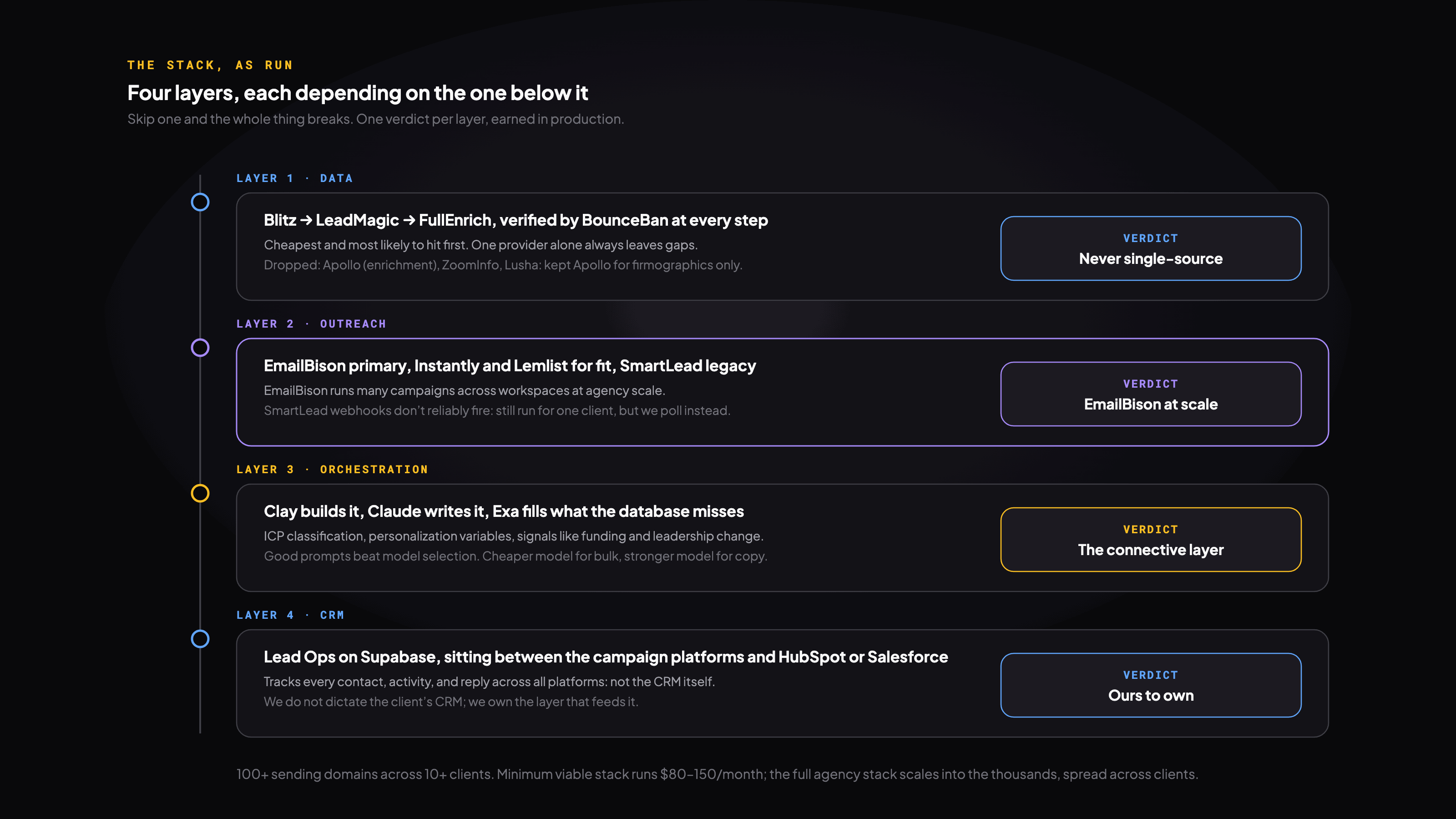
Data and enrichment
Never rely on one data provider. Every provider has gaps. Chaining multiple providers in a waterfall, cheapest and most likely to hit first, and verifying with BounceBan after each step, closes more of the gap than any single source can on its own.
| Provider | Role | Best for | Weakness |
|---|---|---|---|
| Blitz API | First pass, no per-lookup cost | Largest free database, broad coverage | Lower accuracy on enterprise, stale on job changes |
| LeadMagic | Fallback finder | LinkedIn-sourced, fresh titles | Smaller DB, less SMB coverage |
| FullEnrich | Specialty fallback | Enterprise catch-all domains | Expensive at bulk, slower |
| BounceBan (verify) | Verification, every step | Confirming deliverability before anything enters a campaign | Cannot find emails, only verifies |
Cheap SMB lists are mostly covered by Blitz at zero cost; the paid fallbacks handle the more expensive residue. Ordering the waterfall cheapest-first is a real cost lever: querying the expensive providers on everyone, instead of only the leftovers, multiplies your bill for no extra coverage.
- Apollo: fine for account-level firmographics and company research. Kept for that, not for enrichment.
- ZoomInfo: strong org charts, priced for teams bigger than the value it adds us. Dropped.
- Lusha: other providers outperformed it on our ICPs. Dropped.
Research and personalization
Clay is our workflow builder for ICP classification, company research, and personalization variables. Claude powers copy generation: a cheaper model for bulk classification, a stronger model for copy where quality matters more than cost. Good prompts beat model selection. Exa is AI web search for signals a database misses: funding, leadership changes, launches.
Sending infrastructure
3-5 alternate domains per client (.com, .co, .io), never the primary domain. $10-15/domain/year. Google Workspace at roughly $6/mailbox/month, a few mailboxes per domain. Warmup built into the sending platform: 14 days minimum, ideally 21, kept running on all active mailboxes.
We keep sending volume well under the platform's stated ceiling, ramping gradually rather than starting there, and provider matters: Outlook mailboxes need a noticeably lower daily cap than Google Workspace mailboxes to stay clean. Scale by adding domains and mailboxes, never by pushing per-mailbox volume past what the mailbox provider handles well.
Sending platforms
| Platform | Best for | API quality | Weakness |
|---|---|---|---|
| Instantly | Quick setup, simple campaigns | Good, clean REST API | Limited multi-variant testing |
| Lemlist | Email + LinkedIn + phone | Decent | Per-seat pricing gets expensive |
| EmailBison | High-volume, agency ops | Excellent, most flexible | Smaller community, less docs |
| SmartLead | Warmup network, multi-client | Webhooks unreliable, we poll instead | No longer our default |
Instantly for teams under a few thousand sends/month. Lemlist when you want email plus LinkedIn plus phone. EmailBison is our primary platform at agency scale, running many campaigns across workspaces. SmartLead was our primary platform before EmailBison; we still run it for one client, but its webhooks don't reliably fire, so we poll instead of depending on them.
CRM and pipeline tracking
We do not dictate CRM; most clients run HubSpot, some Salesforce, a few Attio or Pipedrive. What we own is the layer between campaign platforms and CRM: a system on Supabase we call Lead Ops, tracking every contact, activity, and reply across all platforms. It answers questions like "how many unique contacts have we reached this month" that most teams cannot.
We manage 100+ sending domains across all clients, each client on its own dedicated infrastructure, never shared between clients.
Analytics and monitoring
- Platform-native analytics: reply rates, bounce rates (we never optimize for opens, they're unreliable).
- Supabase dashboards: cross-campaign reporting, dedup, activity timelines.
- Slack alerts: positive replies, bounce warnings, daily health checks.
- Google Postmaster Tools: domain reputation, checked regularly.
Minimum viable stack
| Tool | What it does | Monthly cost |
|---|---|---|
| Instantly | Sending + warmup | $30 |
| Google Workspace (5 mailboxes) | Sending infrastructure | $30 |
| 5 alternate domains | Brand-safe domains | ~$5/mo |
| Apollo (free tier) | Basic contact data | $0 |
| BounceBan | Email verification | ~$15/mo |
| Total | -- | $80-100/month |
Enough to test whether outbound works with a handful of warm addresses and basic data. The gap: Apollo's free tier finds only a fraction of emails; a real waterfall would catch more.
Full agency stack
| Category | Tools |
|---|---|
| Data & enrichment | Blitz, LeadMagic, FullEnrich, BounceBan |
| Research & AI | Clay, Anthropic API, Exa |
| Sending infrastructure | 100+ domains, hundreds of mailboxes |
| Campaign platforms | Instantly, Lemlist, EmailBison |
| Monitoring & ops | Supabase, Slack, Trigger.dev |
What not to buy
- All-in-one platforms: do data, sequencing, CRM, and analytics at a B-minus level each. Best-of-breed tools connected through Clay outperform them in our experience.
- AI cold email writers: output is generic and increasingly detectable, by spam filters and by prospects. We use AI for research and first drafts, then have a human review the final send.
- Done-for-you domain packages: a markup on a setup you can build yourself in about 30 minutes per domain.
Our tool evaluation framework
- Test with real client campaigns, never demos or free trials on fake data.
- Does it measurably improve a metric we care about? Is it reliable enough to automate? Does the cost justify it over the next-best alternative?
- Fail any question, it gets dropped, even tools we liked.
Picking tools for a new client
- 01Start with their existing sending platform if it works. No reason to migrate.
- 02Set up dedicated infrastructure in week one: domains, DNS, mailboxes.
- 03Connect the enrichment waterfall. Client doesn't need their own data subscriptions.
- 04Configure monitoring: Slack alerts, Postmaster Tools, health checks.
- 05Layer in Clay, Exa, and AI enrichment based on how much personalization the campaign needs.
The single most important tool
Email verification, specifically BounceBan. You can recover from bad copy or weak personalization. You cannot recover from a destroyed sender reputation. Every email we send is checked against BounceBan's deliverability verdict before it enters a campaign, not just against a raw score or an unverified "found" status. Skipping verification to save a few dollars on a large list is the fastest way to burn a domain.
✗ Don't do this
Skip verification to save a few dollars on a 5,000-contact list. Bounces spike. Domain reputation tanks. Weeks of lost sending capacity.
✓ Do this instead
Verify every email before it enters a campaign. Remove the undeliverable addresses. Domain stays clean.
Get the runnable version
Enter your email and we'll send you this playbook, plus the open GitHub repo of setup skills when it ships.
Want this built for your team?
We build and run these systems embedded with your team.